
Local businesses need to follow Google’s guidelines for Google Business Profile if they want to stay compliant and avoid suspensions.
Unfortunately, Google’s guidelines for the platform are pretty long, and there are even unspoken rules that trigger suspensions, so it’s easy for businesses to make mistakes without meaning to.
In this post, I discuss Google Business Profile guidelines and ways to avoid suspensions.
What are Google Business Profile Guidelines?
They’re rules created by Google that every business who wishes to present their business on Google Search and Google Maps must follow.
They explain:
- Who’s eligible for a Google Business Profile
- How to represent yourself on your profile
- What kind of content is allowed on Google
Only businesses who come in contact with customers during designated business hours are allowed to create a Google Business Profile. This includes businesses with physical locations as well as service-area businesses.
Business details must be accurate and identical with wherever else your business details are listed on, especially your website.
Your business name, in particular, must match the name on your business sign.
Content guidelines are more straightforward and are very similar guidelines you’d expect to find on other platforms, banning spam, hateful content and harmful content.
What are the Consequences of Violating Google’s Guidelines?
Violating Google’s guidelines may result in the suspension of your Google Business Profile. Not only does this reduce your business’ visibility on Google, fixing a suspended Google Business Profile isn’t the easiest thing to do.
In some cases, Google restricts your Google account, limiting access to your profile as a result.
If your Google account becomes suspended, disabled or deleted, you’ll need to take extra steps to restore access to your Google Business Profile.
Google also states that actions you perform on other Google products may affect the visibility of your profile on Google.
Here’s the full quote on the company’s Overview page for its Google Business Profile guidelines:
“When a Business Profile is created via an account associated with another Google product, restriction of the non-Business Profile product account may result in suspension of the Business Profile.
When a non-Business Profile account is restricted, content added to the business profile from the restricted account may be rejected. The non-Business Profile account must be reinstated before reinstating the profile.”
To fix a suspended Google Business Profile, you’ll need to figure out which guideline you violated (Google doesn’t always tell you), correct it, and submit an appeal.
You only get a few chances to do this, so I highly recommend working with a reputation management company, such as RepuRocket, as they’ll be much more familiar with Google’s guidelines and what needs to be done to get your profile reinstated.
Common Issues That Lead to Google Suspending Business Profiles
These are common reasons Google might suspend a profile:
- Inconsistencies wherever your NAP is located
- Wrong open hours listed on your profile
- Changing your address on your profile
- Having a service area business but not setting your profile up as one
- Having a business that only operates online
- Listing a virtual office or co-working space as your address
- Using the same phone number as another listing on Google, even if you own both
- Having multiple listings for the same business
- Keyword stuffing
- Not matching your business name on your profile to the business name on your sign
- Making too many edits in a short period of time
- Pin location incorrect
- No permanent signage
- Security issues on your website
Important Google Business Profile Guidelines to Follow
The most important guidelines Google enforces for Google Business Profile can be grouped into the following categories:
- Business eligibility, verification and account
- Location
- Business categories
- Business name
- Business content
- Business hours
- Phone number
- Business website
- Menu
- Products
Business Eligibility, Verification and Account Guidelines
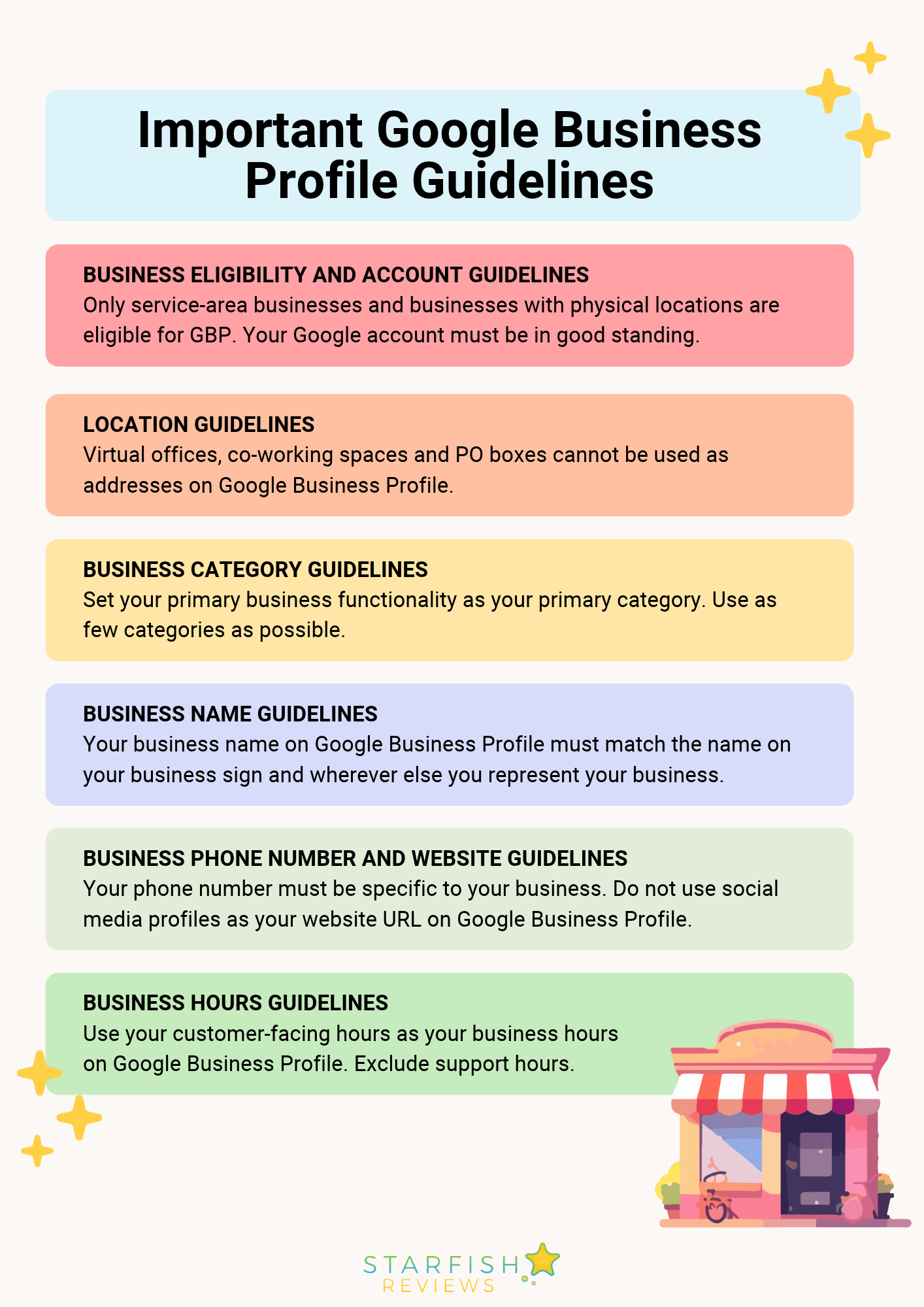
Google states that in order for a business to be eligible for Google Business Profile, it must be a physical business that makes contact with customers during designated business hours.
Exceptions are made for ATMs, video-rental kiosks, express mail drop boxes, seasonal businesses that have permanent signage, and certain delivery-only food services.
Ineligible businesses include online-only businesses, rental properties (an exception is made for sales or leasing offices), and services, classes and meetings that occur at a location you don’t own or rent.
Businesses that offer products and services that have age requirements cannot operate as service-area businesses on Google and must have physical storefronts.
You need to verify your business on Google in order to gain ownership over your profile and make edits to it. Your Google account must also be in good standing.
Location Guidelines
Your business address must be a physical location that customers can visit.
The exception is service-area businesses. These businesses should remove addresses from their listings entirely.
If you have a virtual office or operate out of a co-working space, your business is ineligible for Google Business Profile.
The address on your profile should accurately reflect your actual business location and should not contain any other information.
Include your suite number, floor number or mailbox number on line 2 of the address field. Google states you can include cross streets and nearby landmarks if your address does not reflect the exact location of your business.
Use a map pin if you need to.
Business Category Guidelines
Google recommends choosing as few business categories as possible and to only choose categories that best describe your business and the primary products and services you offer.
Avoid choosing business categories just because they relate to your business.
Business Name Guidelines
Google says your business name on Google Business Profile should match the name on your sign and website.
It should not include:
- Slogans and taglines
- Store codes
- Store hours
- Trademark or registered symbols
- Special characters
- Phone numbers
- Website URLs
- Service or product information
- Location or address
- Translations or bilingual stylings
Business Content Guidelines
Google prohibits a long list of content on each of its platforms, including Google Search and Google Maps.
This list mostly relates to topics like harassment, hate speech, vulgar language and sexual content.
For photos and videos, Google advises users to:
- Upload media you captured yourself
- Avoid screenshots, stock photos, collages and images created by others
- Use high-resolution images
- Avoid editing photos too heavily or manipulating them
- Avoid style edits like darkness, rotations, borders and text
- Avoid excessive filters that alter how the real location is depicted
- Avoid blurry or out-of-focus styles
- Only capture media for the location you’re posting to
- Avoid selfies and other inclusions that draw attention away from the location you’re posting to
These guidelines apply to anyone who wants to publish content on Google, meaning customers and business owners alike.
Business Hours Guidelines
Google states businesses should list their customer-facing hours as their business hours on Google Business Profile, as in the hours customers can shop or receive services from your business.
Certain businesses shouldn’t list hours at all, most notably businesses that have different hours for different activities, such as schools with varied class times, churches with varied worship times and movie theaters with varied showtimes.
If your business has departments, each with its own set of business hours, create a separate profile for each department.
Note: In order for a department to qualify for its own business profile, it must be a distinct entity that’s separate from your main business. The profile can use the same address as the business’ main profile, but the department profile must have its own phone number and business sign. Walmart’s vision and auto care centers are great examples of this.
Seasonal businesses should list their regular hours of operation during the on-season. They should list their businesses as being “temporarily closed” during the off-season.
For businesses with multiple sets of hours, choose one set of hours to list but prioritize them in the following order, as recommended by Google:
- Banks: lobby hours > drive-through hours
- Car dealerships: new car sales hours > used car sales hours
- Gas stations: gas pump hours
- Restaurants: dining in hours > takeout hours > drive-through hours > delivery hours
- Storage facilities: office hours > front gate hours
Phone Number and Website Guidelines
Google’s guidelines for listing a phone number and website on your profile are pretty simple:
- Both must connect to your individual business location
- Your business must have direct control over the phone number you list
- Do not use a phone number that refers users to another line
- Do not list a website URL that redirects the user to another page
- Do not list a social media profile as your website URL
- Do not list any website that does not represent your business as your website URL
- Premium numbers are prohibited
Related: How to Optimize Your Business Website for Local SEO
Menu and Product Guidelines
Google states menus can be used on business profiles to list food and beverage items or services.
Full menus can be specific to meal times (breakfast, lunch and dinner), but you should not create sample menus, such as a menu that only lists popular items.
You should also not link to third-party ordering and delivery services on menu pages.
Products you add to Google must be in line with Google’s Shopping Ads policy, which is a list of product data specifications and shopping requirements products must meet in order to be approved.
Certain products are prohibited from appearing on Google, including alcohol, tobacco products, pharmaceutical products and certain supplements.
You risk having your entire product catalog deleted by adding these products to your profile.




0 Comments